


Tulpon
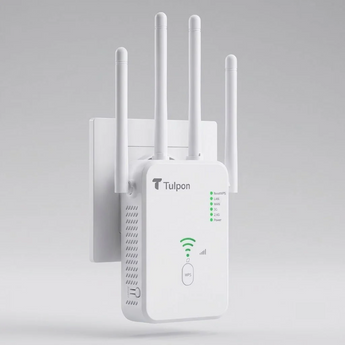
Tulpon Air 1200 Wi-Fi Extender
€34,95
/
Sold out
Tax included.
Couldn't load pickup availability
Bring strong Wi-Fi to every room. The Tulpon Air 1200 extends your existing network with dual band speeds up to 1200 Mbps, and sets up in minutes with one press of the WPS button.
Product Details
Key Features
Shipping & Returns
Shipping
- Order today and it arrives in 1–2 days.
- We deliver in the Netherlands and Belgium.
Returns
- You have 14 days after delivery to change your mind and return your order.
- To start a return, contact our support team with your order number.
- Read the full details on our Shipping & Returns page

Four antennas for wider coverage.

One-touch setup. No technical skills needed.

Three modes: extender, access point or router.


Tech Specs
Dual band Wi-Fi
Connects on both 2.4 GHz and 5 GHz, with speeds up to 1200 Mbps.
Wide coverage
Four antennas push your Wi-Fi further into every room. Keep them upright for the best reach.
Three modes in one
Repeater mode extends your Wi-Fi. Router mode turns a wired internet connection into Wi-Fi. AP mode adds Wi-Fi to an existing wired network.
One-touch setup
Press the WPS button on the extender and on your router within 2 minutes, and you are connected. No app needed.
Cable connection
Plug a TV, game console or computer straight into the LAN port for a steady wired connection.
Smart signal light
The signal bars show you if the extender is in a good spot. Two bars or more means strong Wi-Fi.
What you need
A Wi-Fi router with internet and a free wall socket. No app and no technical knowledge needed.
Best spot
Plug it in between your router and the room with weak Wi-Fi. Keep it away from microwaves, cordless phones and baby monitors.
Setup time
A few minutes. Choose one-touch WPS setup, or set up through your browser.
| Model | Air1200 |
|---|---|
| Wi-Fi speed | Up to 1200 Mbps |
| Frequency bands | 2.4 GHz and 5 GHz |
| Modes | Repeater, Router, AP |
| Antennas | 4 external antennas |
| Ports | WAN port, LAN port |
| Buttons | WPS button, Reset button |
| Setup | One-touch WPS or browser setup |
| Colour | White |
Plug in. Press. Connected.
Questions? We’ve got answers.
Quick answers about setup, placement and ordering. Still stuck? Contact our support team and we’ll help you out.
1. Does it work with my router?
It works with most Wi-Fi routers. For one-touch setup, your router needs a WPS button. If it doesn’t have one, you can set up through your browser instead. Both ways take a few minutes.
2. How do I set it up?
Option 1, one-touch: Plug it in near your router and wait for the 2.4G and 5G lights to come on. Press the WPS button on the extender, then on your router within 2 minutes. When the WPS light stays on, you’re connected.
Option 2, browser: Connect your phone or laptop to the extender’s Wi-Fi name. A setup page opens, where you choose your home network and enter its password.
3. Where is the best place to plug it in?
Halfway between your router and the room with weak Wi-Fi, not in the weak room itself. Look at the signal bars on the extender. Two bars or more means a good spot. Keep it away from microwaves, cordless phones and baby monitors.
4. What do the three modes do?
Repeater mode extends the Wi-Fi you already have.
Router mode creates Wi-Fi from a wired internet connection, such as a modem.
AP mode adds Wi-Fi to an existing wired network.
Most people use Repeater mode.
5. The setup page won’t open?
- Make sure your device is connected to the extender.
- Type the address 192.168.1.1 into your browser and try a different browser if needed.
- The extended network has the same name as your home Wi-Fi with “_EXT” at the end.
- Check that you typed your Wi-Fi password correctly.
- If it still fails, hold the Reset button for 8 seconds and start again.